What this estimator does, and what it does not do
The Freelancer Tax Estimator estimates 2026 United States federal tax for freelancers: self-employment tax (the Social Security and Medicare parts shown separately) plus federal income tax after the standard deduction and the qualified business income (QBI) deduction. It then divides the estimated total into four quarterly payments and suggests setting aside 25–30% of each freelance payment as you are paid, so the quarterly bill does not arrive as a surprise.
Three limits matter before you type anything. First, version 1 covers federal tax only: state tax is not included in this estimate, and state tax rates and state estimated-payment dates will only be added after they are verified against each state tax authority. Second, version 1 offers two filing statuses, single and married filing jointly; other statuses are not modelled yet. Third, everything runs in your browser: there is no account, no sign-up, and nothing is uploaded. Your figures never leave your device.
Estimates only — not tax advice. The result is a planning estimate built from the 2026 federal rules the tool cites. Your final tax is settled when you file, and situations the tool does not model — other filing statuses, credits, or state tax — can move it. Consider consulting a CPA for your situation.
Before you start: gather your 1099s
Start with every 1099 you received or expect for the year, and add them up before opening the tool. The main form for freelancers is the 1099-NEC, which reports nonemployee compensation: what a client paid you for services. You may also have a 1099-MISC for other kinds of payments such as rents or prizes, and a 1099-K if a payment processor or marketplace reported card or third-party-network payments to you. The tool takes one combined figure, so the adding-up happens on your side of the screen.
One warning that saves first-year freelancers real trouble: not receiving a 1099 does not mean the income is not taxable. A client only has to file a 1099-NEC for payments above the reporting threshold, but you generally still report all of your business income, including amounts no client reported. The thresholds themselves changed for 2026, and the companion guide to freelancer tax mistakes and edge cases explains the $2,000 threshold and the 1099-K rules in full.
Step 1: enter your total 1099 income
The first input is Total 1099 income: the gross amount clients and platforms paid you, before any expenses. Enter the full gross figure, not the amount left after you subtract costs — the tool subtracts expenses itself in the next step. If you enter a net figure here and then enter expenses again, the same costs get subtracted twice and the estimate comes out too low.
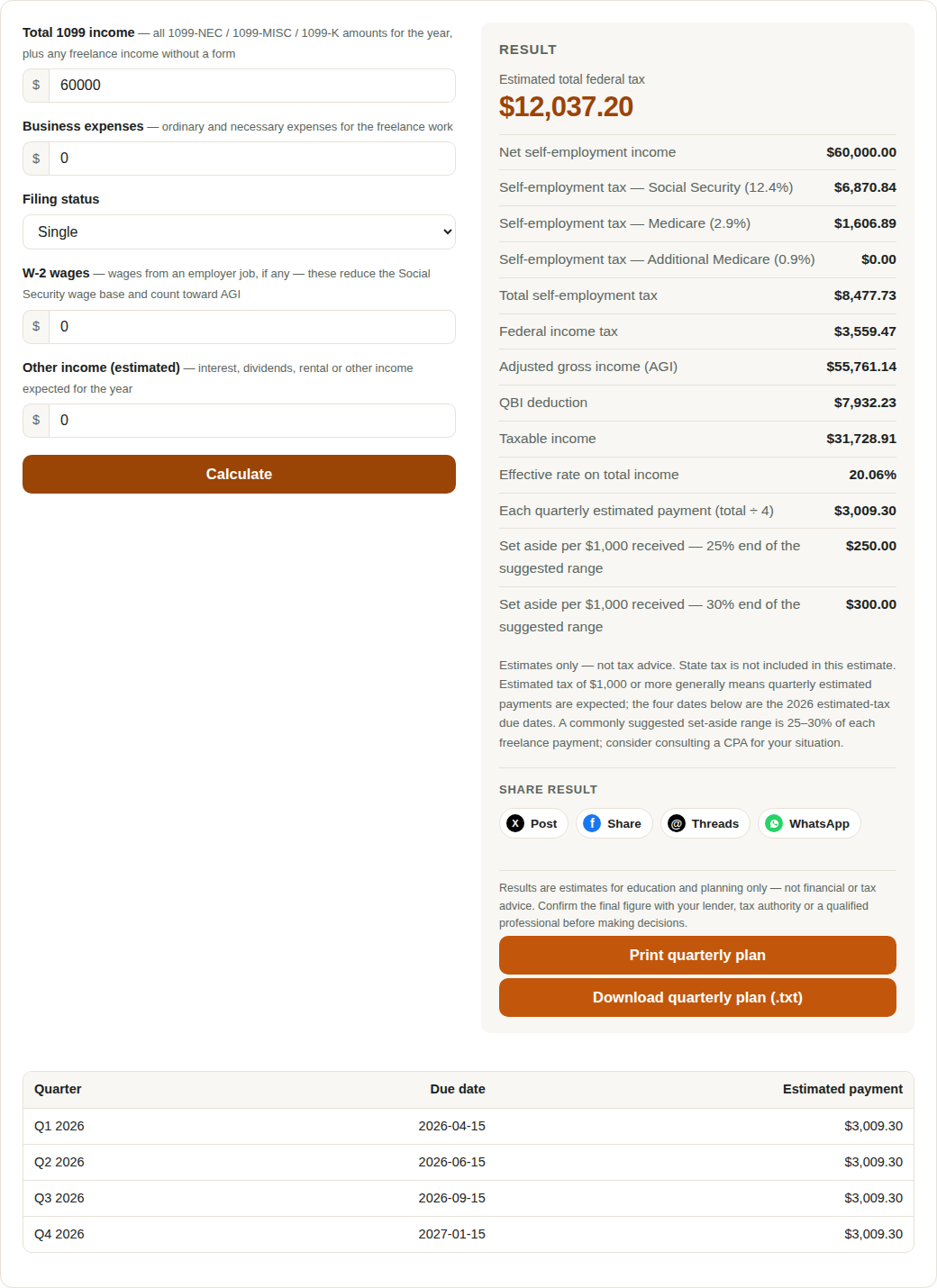
If your income is spread across several clients, add every 1099 together, and include freelance income that arrived without a form. The tool does not ask which client paid what, so a single total is all it needs — but that total has to be complete, because every later line is computed from it.
Step 2: enter your business expenses
The second input is Business expenses: the ordinary and necessary costs of running your freelance work, of the kind reported on Schedule C. The tool subtracts them from your 1099 total to get net self-employment income, and that net figure — not the gross total — is what self-employment tax and the QBI calculation are built on. This single subtraction is why the expense box matters so much: every dollar of genuine expense you leave out inflates the net income the tool taxes.
Keep the figure honest in both directions. Leaving out real expenses overstates your tax; inventing expenses you did not incur understates it and creates problems at filing time. If you are unsure whether a cost counts as a business expense, the conservative move is to leave it out of the estimate and raise it with a CPA — an estimate that is slightly high is a safer planning number than one that is artificially low.
The example in this guide uses $60,000 of 1099 income with no business expenses, so net income equals gross income. That is a teaching choice, not a recommendation: most real freelancers have expenses, and entering them is what makes the estimate yours.
Step 3: choose your filing status
The third input is Filing status, with two options in version 1: single, or married filing jointly. The choice changes two things at once: the standard deduction ($16,100 for single filers and $32,200 for married filing jointly in 2026) and the tax brackets the income is run through. Married filing jointly roughly doubles the bracket widths, so the same income generally produces less federal income tax under the joint status than under the single status — but the tool computes both from your actual figures, so choose the status you will actually file under, not the one that looks cheaper.
If you file under another status, version 1 does not model it. That is a known limit, not a reason to pick the nearest option and trust the result: a head-of-household filer, for example, should treat the tool as a rough orientation only and confirm the figure elsewhere. The calculation logic behind both supported statuses is laid out line by line in the sources and formula guide.
Step 4: enter any W-2 wages
The fourth input is W-2 wages: salary or wages you earned as an employee during the same year, if any. Many freelancers also hold a part-time job, and leaving those wages out distorts the estimate in a specific way. Social Security tax only applies up to the 2026 wage base of $184,500, and W-2 wages use up that room first: the tool charges Social Security tax on your self-employment income only up to what is left of the wage base after your W-2 wages. Omit a $50,000 salary and the tool may charge Social Security tax on self-employment income that should have been above the cap.
W-2 wages also feed your adjusted gross income (AGI) and the combined test for the additional 0.9% Medicare tax, which looks at W-2 wages plus self-employment income together against the $200,000 single threshold. Enter zero if you had no employee wages in the year; enter the actual figure if you did. Do not enter freelance income here a second time — income already counted in the 1099 total must not reappear as wages.
Step 5: enter expected other income
The fifth input is Expected other income: income for the year that is neither 1099 freelance income nor W-2 wages, such as interest or other taxable income you expect. It does not attract self-employment tax, but it does raise your AGI and therefore your federal income tax, so leaving it out understates the income-tax half of the estimate. If you have none, leave it at zero.
| Input | What to enter | What happens if you get it wrong |
|---|---|---|
| Total 1099 income | Gross freelance payments, all clients combined | Too low: the whole estimate is too low; too high: you over-reserve |
| Business expenses | Ordinary and necessary Schedule C-type costs | Left out: net income and both taxes are overstated |
| Filing status | Single or married filing jointly, as you will file | Wrong status: wrong deduction and wrong brackets |
| W-2 wages | Employee wages for the same year, or zero | Left out: Social Security tax may be charged above the wage-base cap |
| Expected other income | Other taxable income, or zero | Left out: federal income tax is understated |
That is the whole input side: five boxes, no state selector, no account, no uploads. The absence of a state selector is deliberate for version 1 — state tax is not included in this estimate, and adding it before state rates and state due dates are verified would produce confident-looking numbers that are wrong.
Reading the results: the $60,000 example
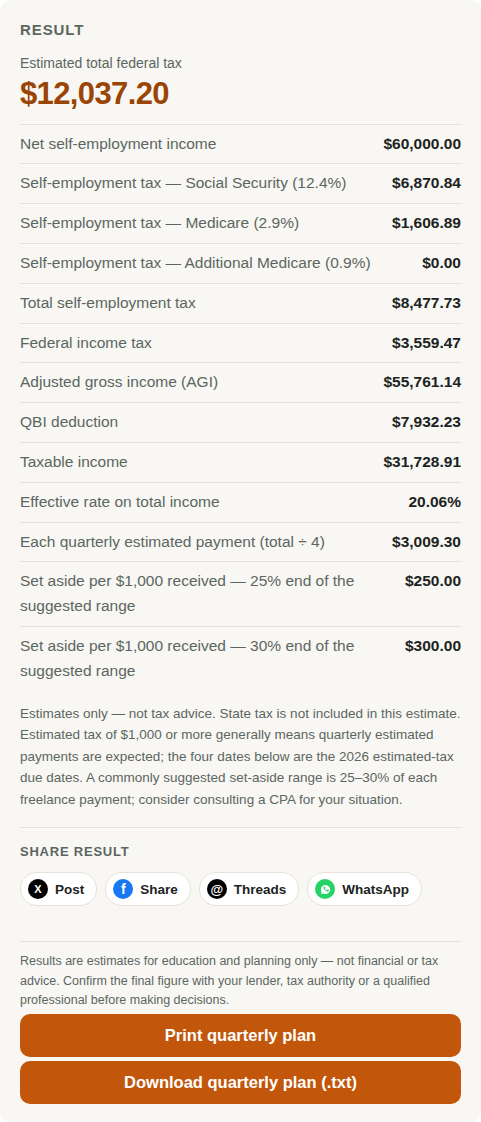
With the example inputs — $60,000 of 1099 income, no expenses, single, no W-2 wages, no other income — the tool produces a full federal breakdown. Self-employment tax comes to $8,478, federal income tax to $3,559, and the estimated total federal tax to $12,037, which is 20.1% of the $60,000 income. The self-employment half splits into Social Security and Medicare; the income-tax half already reflects the $16,100 standard deduction and the QBI deduction, computed as the smaller of 20% of QBI and 20% of taxable income before the QBI deduction. The full arithmetic is checked line by line in the sources and formula guide.
| Result line | $60,000 example |
|---|---|
| Net self-employment income | $60,000 |
| Self-employment tax | $8,478 |
| Federal income tax | $3,559 |
| Estimated total federal tax | $12,037 |
| Effective rate on income | 20.1% |
| Each quarterly payment (total ÷ 4) | $3,009.30 |
| Suggested set-aside per payment | 25–30% |
Two numbers in that table answer different questions, and confusing them is common. The effective rate (20.1%) describes the whole year once deductions are counted. The set-aside suggestion (25–30% of each freelance payment) is a cash-flow habit, deliberately set above the effective rate: it builds a cushion for state tax, which the tool does not estimate, and for income that arrives unevenly across the year. Setting aside 25–30% as you are paid is how a $3,009.30 quarterly bill becomes a routine transfer instead of a crisis.
The quarterly plan: print it, date it, pay it
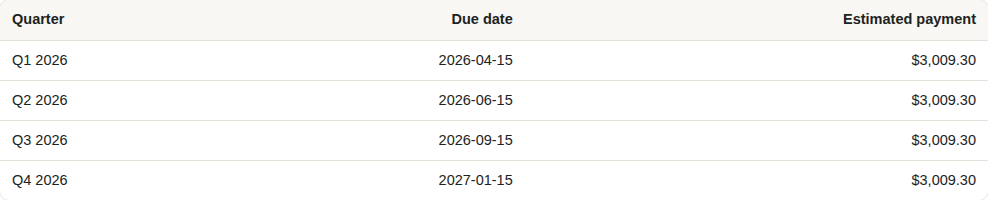
The tool divides the estimated total into four equal quarterly payments and dates them with the 2026 estimated-tax due dates. For the $60,000 example the four payments are $3,009.30 each. The plan can be printed or downloaded as a plain-text file from buttons beside the results, so the schedule survives beyond the browser tab — put the downloaded file where your tax papers live, and put the dates in your calendar when you print it.
| Quarter | Due date | $60,000 example |
|---|---|---|
| Q1 2026 | 2026-04-15 | $3,009.30 |
| Q2 2026 | 2026-06-15 | $3,009.30 |
| Q3 2026 | 2026-09-15 | $3,009.30 |
| Q4 2026 | 2027-01-15 | $3,009.30 |
Estimated tax of $1,000 or more generally means quarterly estimated payments are expected; below $1,000 they generally are not, although the tool still shows the four-date plan for planning. Note the uneven spacing: the second quarter covers only two months (April 15 to June 15), while the fourth quarter stretches to the following January. The dates are the ones that matter, not the quarter labels.
If your income changes during the year — a big new client, a lost contract, a move to part-time employment — rerun the tool with the new totals and adjust the remaining quarters. The plan is an estimate built from today's figures, not a fixed bill, and the final settlement happens when you file. The first-year mistakes guide shows what happens when the quarterly habit is skipped entirely.
Common input mistakes, and how to avoid them
- Entering gross income as net income: typing the 1099 total into the income box and then subtracting expenses from it again — or typing a net figure as the 1099 total and adding expenses on top — double-counts the same costs. Rule: the 1099 box holds gross payments; the expense box holds costs; the tool does the subtraction once.
- Leaving out business expenses: every genuine expense you omit raises net income and therefore raises both halves of the estimate. Before you trust a result, check the expense box against your actual records, not your memory.
- Forgetting W-2 wages: a part-time salary changes the Social Security wage-base room and your AGI. Leaving it at zero when you earned wages overstates Social Security tax and understates income tax.
- Entering the same income twice: freelance income belongs in the 1099 total only. If it also appears in W-2 wages or other income, the tool taxes it twice.
- Treating the estimate as the final bill: the tool covers federal tax only, for the two supported filing statuses, with no credits modelled. State tax, credits, and any status the tool does not support will move the final figure — in either direction.
Run the tool once with your best figures, then run it once more with a pessimistic set — higher income, lower expenses — and compare the two quarterly plans. If the pessimistic plan is still affordable from your set-aside habit, your cash flow is robust to the year turning out better than expected. If it is not, raise the set-aside percentage now, while the year is still young.
Frequently asked questions
Do I need to wait until I have every 1099 before using the estimator?
No. The tool accepts expected totals, so you can estimate with year-to-date figures plus what you still expect to earn, then rerun it as actual 1099s arrive. What matters is that the total you enter is complete for the period you are estimating, including income that arrives without a form.
What if I have no business expenses?
Enter zero. The $60,000 example in this guide does exactly that, and the tool then treats net income as equal to gross income. Most freelancers do have expenses, though, so zero should reflect your records, not a guess.
Why does the tool ask for W-2 wages?
Because W-2 wages use up room under the $184,500 Social Security wage base before self-employment income is taxed, and because they raise your AGI and count toward the combined test for the additional 0.9% Medicare tax. Leaving wages out can overstate Social Security tax and understate income tax.
Why is each quarterly payment exactly one quarter of the total?
Version 1 divides the estimated annual total into four equal payments. That is a planning simplification, not the safe-harbor calculation: the penalty-safe amount depends on last year's tax and on the timing of your income, which the sources guide explains. Equal quarters are easy to budget; the safe-harbor rules are what protect you from penalties.
Does the estimate include state tax?
No. State tax is not included in this estimate in version 1, and the tool does not ask for a state. State tax rates and state estimated-payment dates will only be added after they are verified against each state tax authority. Until then, treat the set-aside habit of 25–30% as covering part of that gap, and check your state's own rules.
Run the numbers yourself
Enter your 1099 total, business expenses, filing status, W-2 wages and other income, and get your 2026 federal estimate with a printable quarterly plan.
Estimates only — not tax advice. This guide walks through a planning estimate for 2026 federal tax only; state tax is not included, and the tool models single and married-filing-jointly statuses only. Confirm the final figure with a CPA or the IRS guidance for your situation before making tax decisions.